
What is an addon domain? #
An addon domain is a second, completely separate domain hosted inside the same cPanel account — for example running anothersite.com alongside example.com. It gets its own folder, its own email addresses and its own forwarders, exactly like your main domain.
What is a subdomain? #
A subdomain is a section of a domain you already own, written as a prefix: blog.example.com or store.example.com. It behaves as a separate site, with its own files and its own WordPress installation if you want one, but it uses the domain you already have.
Subdomains are useful when you want to keep parts of a project apart — a blog, a forum, a shop or a staging copy — without buying another domain.
Creating either one #
1. Log in to cPanel and open Domains.

2. Click Create A New Domain.
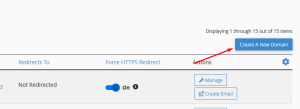
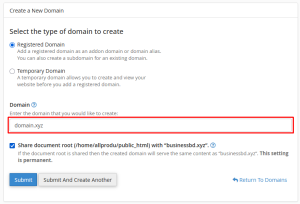
3a. For an addon domain — enter the full domain name at the top. The document root appears in the last field. The domain must already be registered and pointing at our nameservers before visitors can reach it; adding it here does not change where it points.
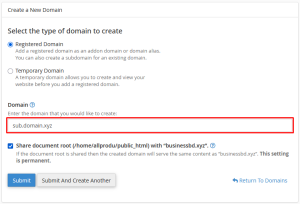
3b. For a subdomain — enter the full subdomain, for example blog.example.com. Subdomains work straight away, because they inherit the DNS of the parent domain.
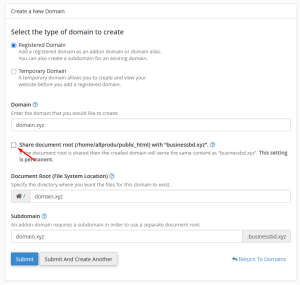
4. Untick Share document root. This is the step that matters most.
Why unticking that box matters #
Leaving Share document root ticked points the new domain at the same folder as your main website, so it simply shows your existing site instead of its own. Unticking it makes cPanel create a separate folder, named after the domain unless you choose otherwise, and the new site lives there.
public_html— your main domainpublic_html/anothersite.com— an addon domainpublic_html/blog— a subdomain
Worth knowing #
- Every addon domain also gets a preview address in the form
addon.your-main-domain.com, which is handy for checking the site before DNS has finished pointing at us. - SSL is issued automatically for both, though it may take a short while. See installing SSL certificates.
- Check how many domains your plan allows before adding more. If you need a larger plan, see switching to another plan.